Blindfold
Gambling blocker for iPhone & iPad

Block gambling apps and sites on your iPhone and iPad.

Blindfold stops known sportsbook, casino, sweepstakes and prediction market apps from opening, and blocks gambling websites in Safari and inside your other apps.

Requires iOS 26. 7 days free, then $19.99/year. Or $1.99/week, or $69.99 once. Family Sharing included.

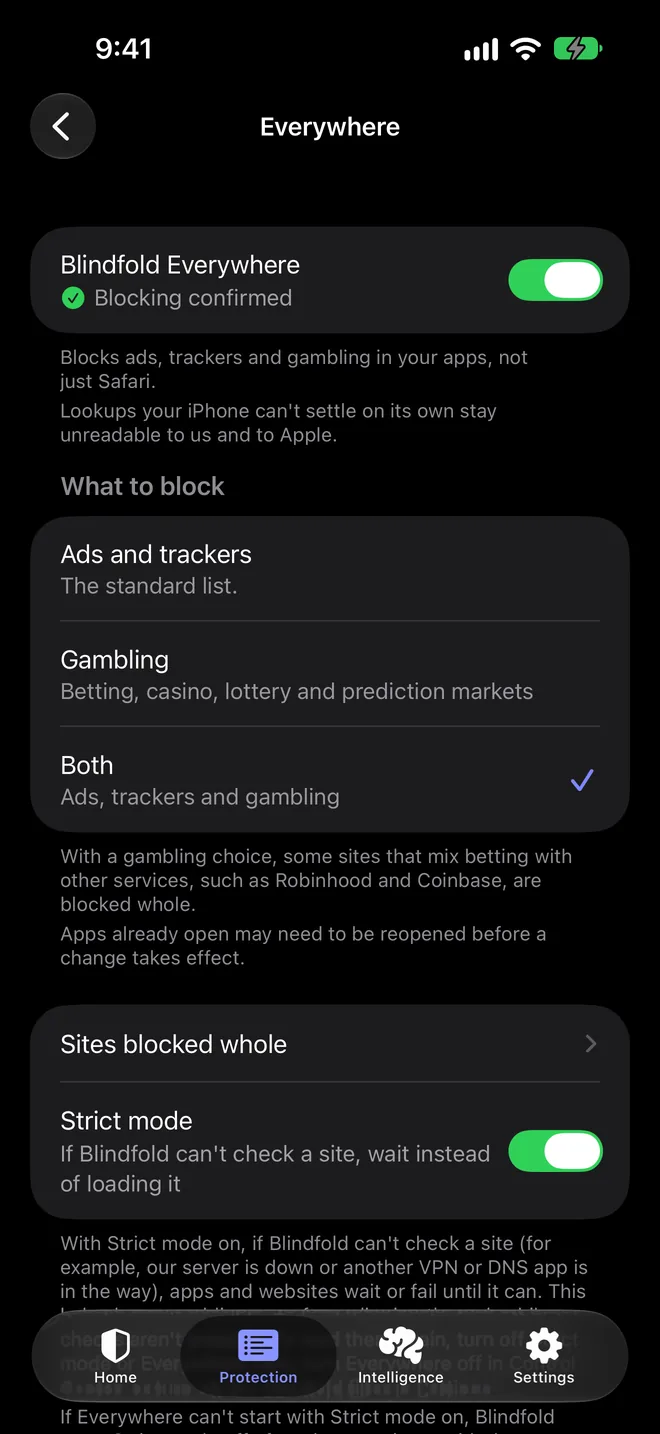
Blindfold's Everywhere screen with Blindfold Everywhere on and blocking confirmed, and What to block set to Both: ads, trackers and gambling.

How to turn it on

  1. 1

    Choose gambling in Everywhere

    In Blindfold, open Protection, tap Everywhere, turn it on and choose Gambling, or Both (ads, trackers and gambling). Gambling websites stop loading in Safari and in your other apps.

  2. 2

    Block gambling apps

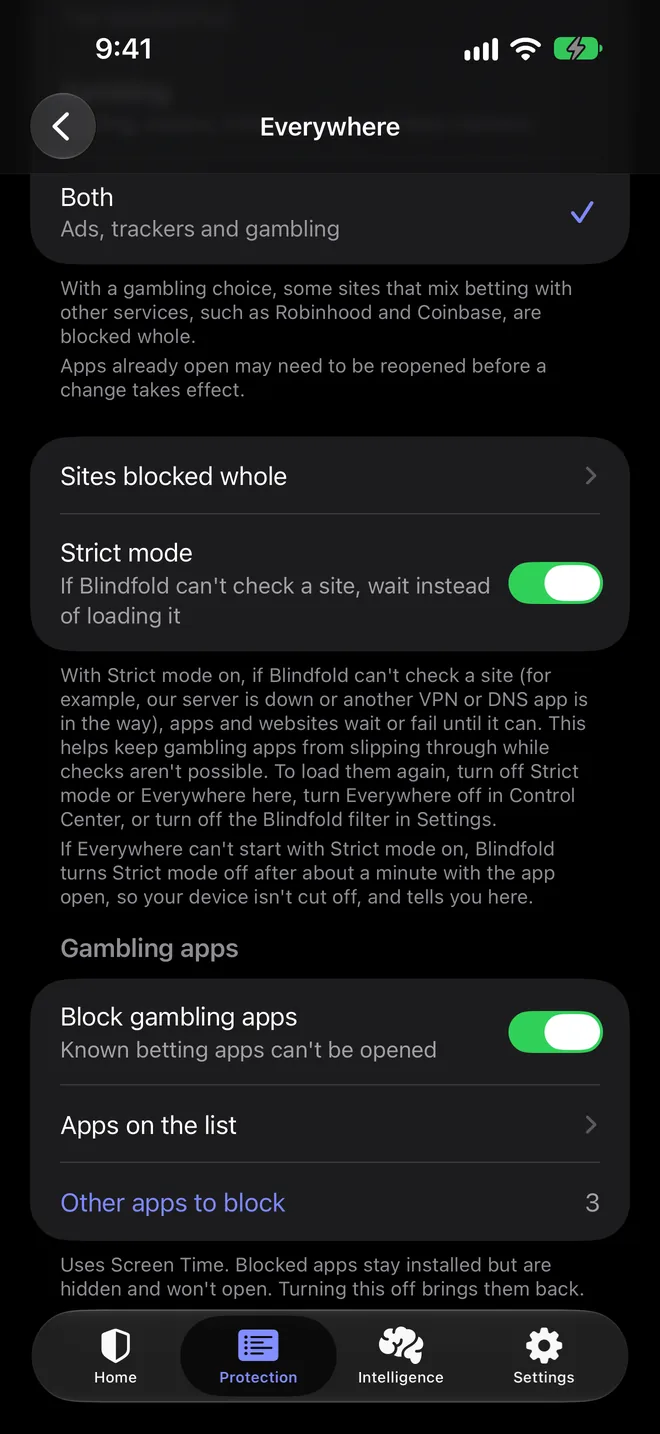
    Turn on Block gambling apps and allow Screen Time access. Known betting apps on your phone won't open. They stay installed, and come back if you turn this off.

  3. 3

    Add your own apps

    Pick any other app you want blocked, and turn on Strict mode so sites wait until Blindfold can check them instead of loading unchecked.

Blindfold's gambling settings with Strict mode on, Block gambling apps on, and three other apps added to block.

Gambling apps won't open

Known sportsbook, casino, sweepstakes and prediction market apps show a Screen Time screen instead of opening. Add any other app you want blocked, and turn on Strict mode so sites wait until Blindfold can check them.

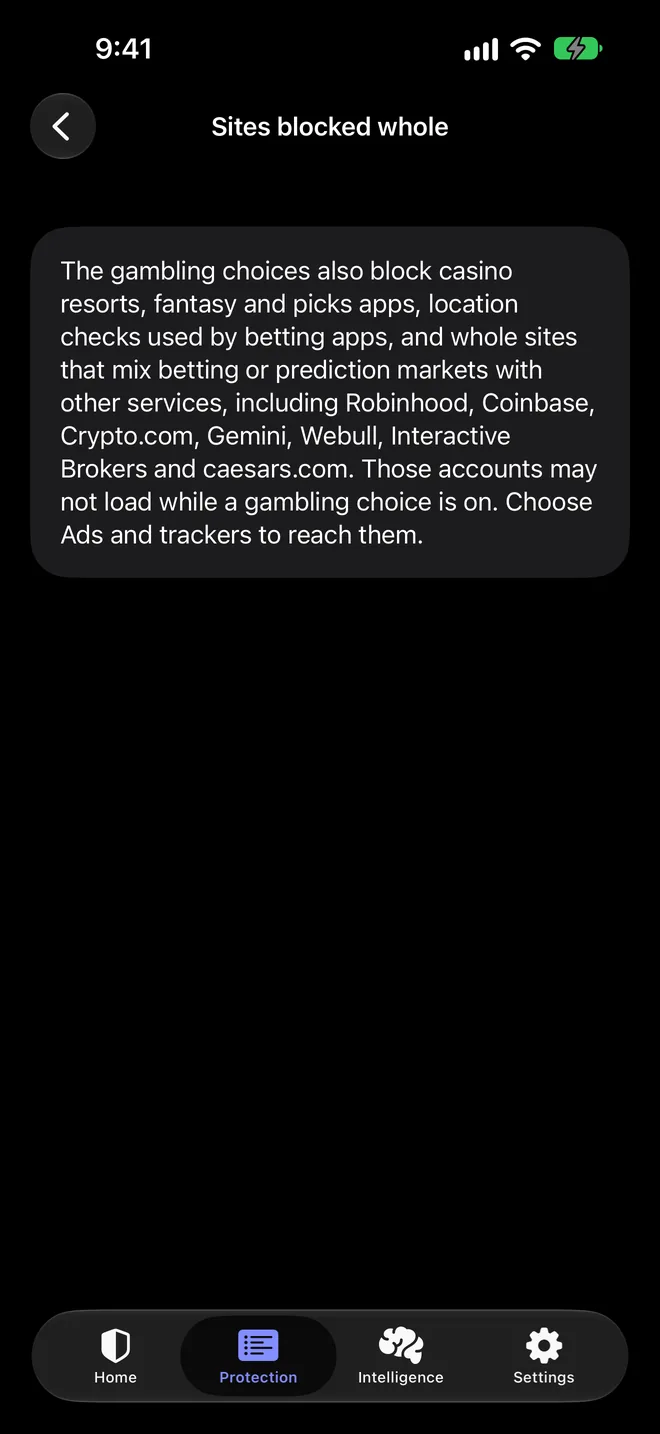
Blindfold's Sites blocked whole screen, listing Robinhood, Coinbase, Crypto.com, Gemini, Webull, Interactive Brokers and caesars.com.

Sites that mix betting with trading

Some trading and crypto apps now offer prediction markets and sports contracts. While a gambling choice is on, Blindfold blocks those sites whole and lists them in the app.

What Blindfold blocks

  • Gambling apps. Known sportsbook, casino, sweepstakes casino and prediction market apps won’t open. Blindfold uses Apple’s Screen Time to block them, so they stay installed but show a Screen Time screen instead. You can add any other app too.
  • Gambling websites. Blindfold Everywhere blocks known betting, casino, lottery and prediction market sites in Safari and inside other apps, including the servers some betting apps use behind the scenes.
  • Sites that mix betting with other services. Some trading and crypto apps now offer prediction markets or sports contracts. While a gambling choice is on, Blindfold blocks sites like Robinhood and Coinbase whole, and tells you which ones in the app.
  • Ads and trackers too, if you want. Choose Both to block ads, trackers and gambling at once.

Turn on Strict mode if you want sites to wait until Blindfold can check them. Without it, a site can load when a check isn’t possible, for example when another VPN app is in the way.

What it doesn’t do

Blindfold blocks apps and sites it knows about. A new app or site may not be on the list yet, so add any app you’re worried about yourself. It also doesn’t stop you from turning it off. It’s there to put time and a step between you and a bet, and it works best alongside other support.

Other ways to block gambling on iPhone

You can do some of this with Apple’s built-in settings. Our guides walk through each step:

Many banks and card issuers can also block gambling payments, and many states and countries run self-exclusion programs for licensed operators.

If you need to talk to someone

In the US, you can call or text 1-800-GAMBLER for free, confidential help, any time. Outside the US, search for your country’s gambling helpline.

Questions about blocking gambling

Which gambling apps does Blindfold block?

Blindfold keeps a list of known sportsbook, casino, sweepstakes casino and prediction market apps. If one of them is installed, it won't open while Block gambling apps is on. You can add any other app yourself. The list is updated over time, so a brand new app may not be on it yet.

Does it block gambling websites too?

Yes. With Everywhere set to Gambling or Both, known betting, casino, lottery and prediction market sites stop loading in Safari and inside your other apps.

Does it work on iPad?

Yes. Blindfold runs on iPhone with iOS 26 and iPad with iPadOS 26, and both gambling app blocking and gambling site blocking work the same way on iPad.

Why are Robinhood and Coinbase blocked?

Some services mix betting or prediction markets with other features, so Blindfold blocks those sites whole while a gambling choice is on. That includes Robinhood, Coinbase, Crypto.com, Gemini, Webull, Interactive Brokers and caesars.com. Choose Ads and trackers instead if you need to reach them.

Can I turn it off?

Yes. Blindfold is a tool you set up for yourself, not a lock. Blocked apps stay installed and come back when you turn app blocking off. If you want it harder to undo, ask someone you trust to help you decide when to turn it off.

Does Blindfold see which sites I visit?

No. Most addresses are checked against a list on your device. When a lookup needs Blindfold's service, private information retrieval keeps the address unreadable to us. Blindfold has no accounts and collects no browsing data.

Make betting apps and sites harder to reach.

Turn on gambling blocking once, and it keeps working in the background on your iPhone and iPad.

Requires iOS 26. 7 days free, then $19.99/year. Or $1.99/week, or $69.99 once. Family Sharing included.